
Your first project in Symbiont
You do not need a finished specification to start. You do need a person with a problem and a way to tell whether solving it would matter. This walkthrough follows a fictional handoff tool for small design studios, from the first description to reviewing an output.
Start one project, make the brief specific, and review the next decision before expanding the scope.

Start with a situation, not a feature list
Sign in, open your dashboard and use the new-product composer. Describe who is struggling, what happens today and what a useful result would look like. Select Start to open the project workspace. You can return to that project from the dashboard; you do not need a new project for every revision.
For the studio tool, say whether clients must keep using email and whether only a project lead can approve work. Those constraints change the product. Include the country or market if it matters, and mark guesses as guesses: “I think studios would pay monthly” is a starting assumption, not customer evidence.
Example brief · fictional product
Small design studios collect client feedback across email and chat. Before handoff, the project lead manually reconciles conflicting requests. I want to test whether one approval record saves that reconciliation step. Start with a single client and one deliverable. We do not need invoicing or a client portal yet.
Asking for advice does not answer the brief
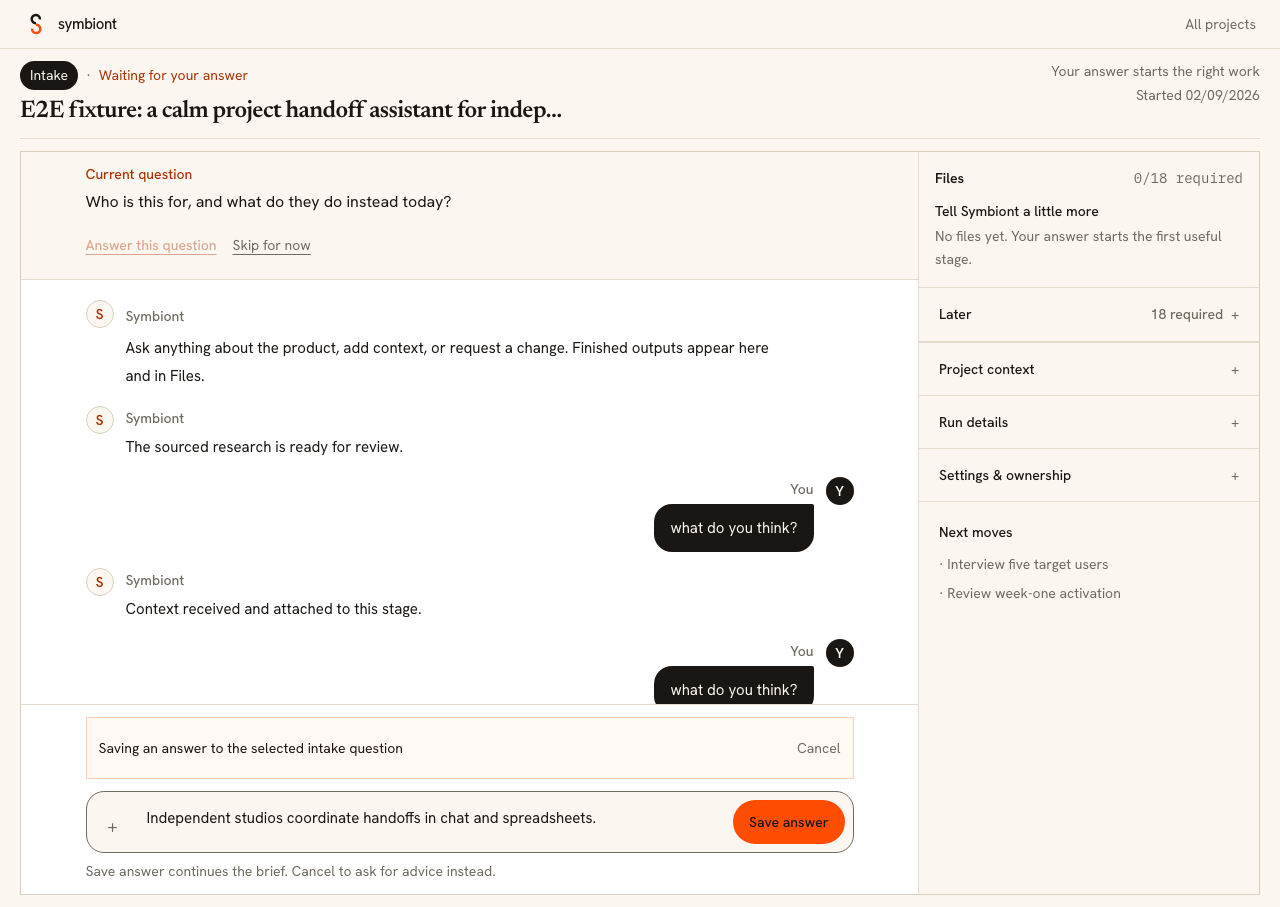
The project conversation has two different actions. Send asks a question or adds context to the discussion. If Symbiont has an intake question open, choose Answer this question when you want to commit an answer to the brief, then use Save answer. Cancel returns you to conversation mode.
For example, ask “Which type of studio should I start with, and why?” in ordinary chat. Once you have chosen a segment, save that choice as the intake answer. If you do not know, use the explicit skip option instead of putting a random answer into the project. That leaves the uncertainty visible.
Open the output before approving it
Use Files to find project outputs. Read the relevant research, brief or other material before approving the stage. Ask for a specific correction in the conversation: name the file, the section and what is wrong. A request such as “Separate competitor prices from your pricing recommendation” is easier to act on than “Make it better.”
Approval is a separate control, not an ordinary chat reply. Treat it as a decision about the current work. If an important assumption changes, ask how it affects later outputs rather than approving documents that still describe the old idea. Keep one pilot moving through the process before creating variations of it.
A useful review request
In the research, the target customer changes from independent studios to enterprise agencies. Keep the original small-studio segment. Show which findings still apply, which are uncertain, and what I should check with a studio owner before approving the next stage.
Choose a next step you can observe
For the studio example, a sensible next step might be a conversation with a project lead about their last handoff. It might instead be a clickable prototype if the main uncertainty is whether a client understands the approval flow. These are different tests; ask which uncertainty the proposed work will reduce.
Keep the project status in view when work is running or waiting for you. If something appears stuck, report the stage and visible error in the existing project. Creating another project loses the shared context and does not explain the first failure. Before a real launch, use the launch checklist below rather than treating the number of files as a release verdict.
Before you move on
- The brief names a specific user and today's workaround.
- Unknowns are labelled instead of being filled with guesses.
- Advice is sent in chat; committed intake answers use Save answer.
- I have opened the work behind the next approval.
- The next test has an observable result.
Prepared with AI assistance from Symbiont’s product workflow. Examples are illustrative; interface captures use demonstration data. About these guides.
Put the next decision in your project
Bring your brief, evidence or review question into one conversation.
Open your workspace